How to Verify Risen Solar Panels Online in Pakistan
Risen is the brand most often written off as impossible to check in Pakistan. The reason is not a missing service. It is a dead domain that half the internet still links to. Here is the address that works.
No published format, so expect no particular length or prefix. It is not the model number, which is shorter and shared by thousands of panels.
Serial number is present on the solar panel label and on the frame.
Your country, the serial number, and a verification code.
Worth knowing Risen is the brand most often written off as uncheckable in Pakistan, and the reason is a dead domain rather than a missing service. risenenergy.com, the address almost every listing still carries, does not answer at all. Their live site is risen.com. The form itself is laid out like Jinko's: country first, then the serial number, then a verification code from a small image. Pakistan is in the country list, so pick it rather than leaving the default.
risen.comRisen’s own site. A real Risen check happens here and nowhere else.
We have found no sites imitating Risen so far. That can change at any time, so read the address bar before you type.
کوئی مقررہ فارمیٹ شائع نہیں کیا گیا، اس لیے کسی خاص لمبائی کی توقع نہ رکھیں۔ یہ ماڈل نمبر نہیں ہے۔ ماڈل نمبر چھوٹا ہوتا ہے اور ہزاروں پینلز پر ایک جیسا ہوتا ہے۔
سیریل نمبر سولر پینل کے لیبل اور فریم پر موجود ہوتا ہے۔
آپ کا ملک، سیریل نمبر، اور ایک تصدیقی کوڈ۔
جاننے کی بات پاکستان میں Risen کو اکثر ایسا برانڈ سمجھا جاتا ہے جس کی تصدیق ممکن نہیں، اور اس کی وجہ کوئی غائب سہولت نہیں بلکہ ایک بند ڈومین ہے۔ risenenergy.com، جو آج بھی تقریباً ہر فہرست میں لکھا ملتا ہے، بالکل جواب نہیں دیتا۔ ان کی اصل سائٹ risen.com ہے۔ فارم Jinko جیسا ہے: پہلے ملک، پھر سیریل نمبر، پھر ایک چھوٹی تصویر میں دیا گیا تصدیقی کوڈ۔ ملکوں کی فہرست میں پاکستان موجود ہے، اسے خود منتخب کریں، پہلے سے لکھا ہوا نہ رہنے دیں۔
risen.comRisen کی اپنی ویب سائٹ ہے۔ Risen کی اصل تصدیق صرف یہیں ہوتی ہے، کہیں اور نہیں۔
ابھی تک ہمیں Risen کی نقل کرنے والی کوئی ویب سائٹ نہیں ملی۔ یہ کسی بھی وقت بدل سکتا ہے، اس لیے ٹائپ کرنے سے پہلے ایڈریس بار ضرور دیکھیں۔
The domain problem
Almost every listing, directory and solar guide still gives Risen’s website as risenenergy.com. That address does not answer. It is not slow, not blocked, not geo-restricted: the server refuses the connection outright. We tested it again on 6 October 2026.
Risen’s live site is risen.com. Their English site at en.risen.com links the check from its own footer as Module Query Serial Number, and that is the form the button at the top of this page opens.
To be precise about what is dead: it is the website. The old domain still carries their support mailbox, and Risen print afterservice@risenenergy.com at the bottom of the verification form itself. So an email to that address is not a dead end even though the website on the same domain is. The phone number printed beside it, 400-8291-000, is a Chinese domestic service line and will not dial from Pakistan.
This matters beyond convenience. When the real address is hard to find, the gap gets filled by somebody else. If you search for Risen verification and land on a site that is neither risen.com nor linked from it, check the address bar twice before you type a serial number into it.
Finding the serial number on your panel
Risen prints it on the module label and again on the frame. Take it from the module itself, not from a pallet sticker or a delivery note, and if the two copies on the panel disagree, ask about that before you go any further.
Risen publishes no length or prefix, so there is nothing to measure your number against before you submit it. Copy it exactly as printed and keep letters as letters.
Checking it, step by step
Step 1: choose your country first
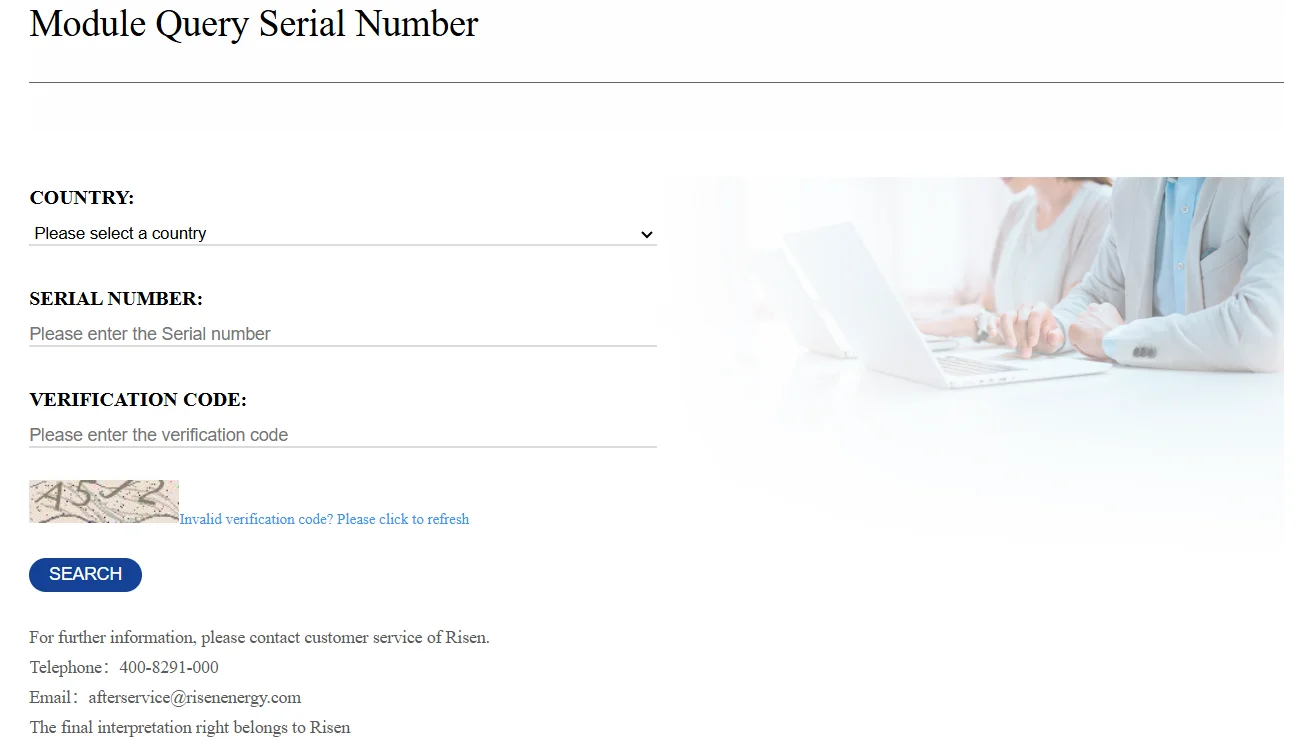
The form opens with a country list before anything else, the same way Jinko does. Scroll to Pakistan and select it. It is in the list. Do not leave the default sitting there, because the country is part of the query and not a formality.
Step 2: type the serial number
One field, labelled Please enter the Serial number. Exactly as printed, letters kept as letters, leading zeros kept.
Step 3: read the verification code
Risen shows a small distorted image with a code in it and asks you to retype it. This is there to stop bulk automated lookups, not to catch you out. Beside the image is a link reading Invalid verification code? Please click to refresh. If the characters are genuinely unreadable, use it and take a fresh one rather than guessing, because a wrong code and a serial that is not in their records produce much the same disappointment.
Step 4: press SEARCH
Risen answers from their own records. There is a Search Others button beside the result, which is the one to use if you are working through a pallet rather than checking a single panel.
What the result means
The serial is found
Risen made this module and the number is in their records. That is what the check proves. It is silent on transit damage, on storage, and on whether your seller will honour anything in two years time.
Because the form asked for your country, read the whole answer rather than only looking for a pass. Where a lookup reports the market a module was sold into, a genuine panel that arrived outside the official channel can produce a confusing answer. The panel is real; the route it took may not have been the one your warranty assumes.
Nothing comes back
Check the serial again off the module itself, character by character. Then try the copy on the frame if the label copy failed. Only after that treat it as a problem.
If a correctly copied serial still returns nothing, take it up with your supplier in writing before the rest of the consignment is installed, and ask them to match your serial numbers against the import documents.
Common questions
Why does risenenergy.com not work?
The server refuses connections on that address. We do not know why and Risen has not said. What we can say is that it has been refusing for as long as we have been testing it, and that risen.com is live and serves the check.
Why does it ask for my country?
Risen, like Jinko, keeps records by sales region. Picking Pakistan tells the lookup where to search. It is not a marketing question and skipping it can change the answer you get.
Does it cost anything?
No. No fee and no account. The verification code is the only hurdle and it exists to stop bulk automated lookups.