How to Verify Aiko Solar Panels Online in Pakistan
Aiko runs a free check, and the page almost everybody links to is not it. Here is the address that actually holds the form, what the barcode looks like, and why a Chinese title in your browser tab does not mean you are in the wrong place.

Y00XXXXXXXXXXXX0001Around 19 characters. It is not the model number, which is shorter and shared by thousands of panels.
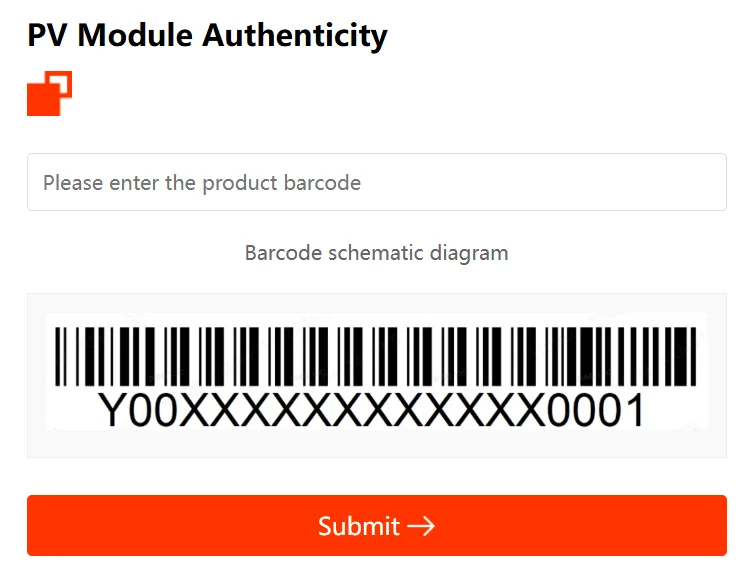
Serial number is present on the label on the solar panel. Aiko draws its own diagram of the label on the check page, above the box.
The product barcode. One box, no captcha.
Worth knowing Two things catch people out. The browser tab shows a Chinese title even on the English page, which looks wrong and is not: the page is Aiko's own, and the #en on the end of the address is what puts the form into English. The box also refuses anything past 25 characters, so a code that will not fit is a sign you are reading the wrong line on the label. There is a camera button beside the box for photographing the label instead of typing it. If a barcode you have copied correctly still fails, Aiko asks you to email Marketing@aikosolar.com rather than treat the panel as counterfeit on the spot. Worth doing before any argument with a vendor.
verify.aikosolar.comAiko’s own site. A real Aiko check happens here and nowhere else.
We have found no sites imitating Aiko so far. That can change at any time, so read the address bar before you type.
Y00XXXXXXXXXXXX0001تقریباً 19 حروف کا۔ یہ ماڈل نمبر نہیں ہے۔ ماڈل نمبر چھوٹا ہوتا ہے اور ہزاروں پینلز پر ایک جیسا ہوتا ہے۔
سیریل نمبر سولر پینل کے لیبل پر موجود ہوتا ہے۔ Aiko اپنے تصدیقی صفحے پر خانے کے اوپر لیبل کا نقشہ بھی دکھاتا ہے۔
پروڈکٹ بار کوڈ۔ ایک ہی خانہ، کوئی کیپچا نہیں۔
جاننے کی بات یہاں دو باتیں لوگوں کو الجھاتی ہیں۔ پہلی یہ کہ انگریزی صفحہ کھولنے پر بھی براؤزر کے ٹیب میں عنوان چینی زبان میں دکھائی دیتا ہے۔ یہ غلط نہیں، صفحہ واقعی Aiko کا اپنا ہے، اور پتے کے آخر میں لگا ہوا en# ہی فارم کو انگریزی میں بدلتا ہے۔ دوسری یہ کہ خانہ 25 حروف سے زیادہ قبول نہیں کرتا، اس لیے جو کوڈ اس میں نہ سمائے، سمجھ لیں کہ آپ لیبل کی غلط لائن پڑھ رہے ہیں۔ خانے کے ساتھ ایک کیمرے کا بٹن بھی ہے، ٹائپ کرنے کے بجائے لیبل کی تصویر لینے کے لیے۔ اگر درست نقل کیا گیا بار کوڈ بھی ناکام ہو تو Aiko کہتا ہے کہ پینل کو فوراً نقلی سمجھنے کے بجائے Marketing@aikosolar.com پر ای میل کریں۔ بیچنے والے سے بحث سے پہلے یہ کر لینا بہتر ہے۔
verify.aikosolar.comAiko کی اپنی ویب سائٹ ہے۔ Aiko کی اصل تصدیق صرف یہیں ہوتی ہے، کہیں اور نہیں۔
ابھی تک ہمیں Aiko کی نقل کرنے والی کوئی ویب سائٹ نہیں ملی۔ یہ کسی بھی وقت بدل سکتا ہے، اس لیے ٹائپ کرنے سے پہلے ایڈریس بار ضرور دیکھیں۔
Finding the barcode on your panel
Aiko prints it on the label on the module. Their own check page draws a diagram of the label directly above the box you type into, captioned Barcode schematic diagram, so if you are unsure which line to read, open the form first and look at the picture before you touch the panel.
Take the code from the module itself, not from a pallet sticker or a delivery note. Those get copied by hand somewhere along the way, and one wrong character turns a genuine panel into a failed check and an argument you did not need to have.
If it will not fit, you are reading the wrong line
The box refuses anything past 25 characters. That limit is quietly useful: the label carries several numbers, and most of the ones people try first are the model number or a batch code. If what you are copying runs past 25 characters, or if the box stops accepting your typing halfway, you are on the wrong line of the label.
Aiko publishes no format, but their own diagram gives you a shape to compare against. The sample on it reads Y00XXXXXXXXXXXX0001: nineteen characters, starting with a letter and two zeros, ending in a four digit sequence, with the middle twelve masked out by Aiko. Treat that as a hint and not a rule. One sample from one diagram is not a specification, and a code of yours that looks different is not proof of anything. The only real check is the one on their site.
Checking it on Aiko’s website, step by step
Step 1: go to the form, not to the page about the form
Search for Aiko panel verification and you land on aikosolar.com/en/aiko-pv-module-authenticity/. That page carries a heading, a paragraph about what to do if a check fails, and no form at all. People read it, find nothing to type into, and conclude Aiko has no checker.
It has one. The page holds a single button, Official Product Authenticity, and that button opens verify.aikosolar.com, which is where the form lives. The green button at the top of this page goes straight there and skips the detour.
Step 2: expect a Chinese title, and carry on
When the form opens, your browser tab shows a title in Chinese even though the page itself is in English. This is the single most common reason people close it again, assuming they have been sent somewhere they should not be.
They have not. Aiko is a Chinese manufacturer and the tool is shared across their languages. What switches the form to English is the #en on the end of the address. Our button includes it. If you ever reach the form and the labels are in Chinese, add #en to the end of the address and reload.
Step 3: type the barcode, or photograph it
One box, labelled Please enter the product barcode. No country to pick and no captcha to squint at, which makes this one of the quicker checks on this site. The orange Submit button below the diagram is the only other control.
There is also a camera button beside the box. On a phone, standing in front of the panel, photographing the label is both faster and less error prone than typing a long code into a small field. If you are checking a pallet of modules, use it.
Step 4: submit and read the answer
Press the submit button and Aiko answers from their own records. Read the whole answer rather than just looking for a green tick: what the lookup returns about the module is as useful as whether it returned anything at all.
What the result means
The barcode is found
Aiko made this module and the barcode is in their records. That is what the check proves and it is worth having. It does not tell you the panel has not been damaged in transit, that it has been stored properly, or that the seller will honour anything. It tells you the module is real.
Nothing comes back
Do not escalate yet. Check the code again, character by character, against the label on the module rather than against whatever you wrote down. Mistaking 0 for O and 1 for I accounts for most failed checks.
If a code you have copied correctly still fails, Aiko asks you to email them at Marketing@aikosolar.com rather than treat the panel as counterfeit on the spot. Do that before any argument with a vendor. An email from the manufacturer carries weight that your phone screen does not.
Common questions
Why does the page look Chinese?
Because the title is, and the form is not. Aiko runs one verification tool across its markets. The #en on the end of the address puts the form into English, and the tab title is simply not translated. The address is a subdomain of aikosolar.com, which is the part that matters.
Does it cost anything?
No. Aiko charges nothing and asks for no account, no email address and no phone number to run a check.
Can I check before I pay?
Yes, and you should. The check needs the barcode and nothing else, so a photograph of the label is enough. Ask the seller for a clear picture of the label on the actual modules being delivered, not a stock photo, and run it before the money moves.